How farm Departments organise people and work
How farm Department workforce management groups people and work without changing pay, and how membership differs from the Department on a Time Entry.
A Department is a work area inside one farm business
A Department groups people and work within one Organisation. It can match a familiar part of the farm, such as Harvest Crew, Packing Shed, Irrigation or Admin.
Departments help you see where people usually work and where recorded work happened. They never set a worker's pay. Pay comes from the worker's accepted wage agreement.
Membership and work records answer different questions
A Department Membership records where a worker usually belongs. A worker can belong to more than one Department.
The Department on a Time Entry records where that work happened. A worker can record work in any enabled Department in the same Organisation. Doing so does not add a Department Membership or move the worker from their usual crew.
Every active worker has one primary Department
Each active worker keeps at least one Department Membership and exactly one primary Department. The primary Department gives AgCore a stable home for the worker when the person belongs to several work areas.
It is an organising choice, not a restriction. The worker can still record work in another enabled Department when that is where the work happened.
A Department can carry its own break rule
A Department can use the Organisation's default break settings or carry its own automatic break rule. This lets a work area reflect a different working pattern without turning the Department into a pay rule.
The rule belongs to the Department where the work is recorded, not to the worker's primary Department. Manual breaks remain part of the work record.
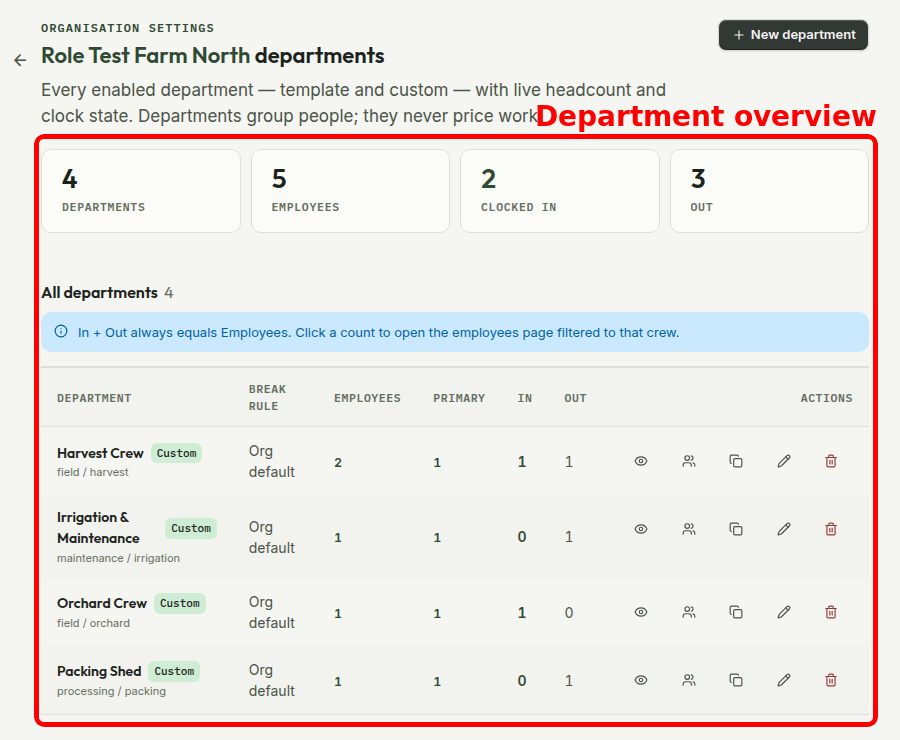
The overview shows the current crew state
The Departments screen shows the number of members, primary members, people clocked in and people out for each work area. You can use those counts to open the employee list already filtered to that crew.
If another Organisation needs the same structure, AgCore can copy the Department's name, type, subcategory and break rule. It does not copy people, memberships or pay details.
Open Departments
Already have a login? Open Departments to review your work areas. The detailed guides for setting up Departments and managing Department Members stay inside the app beside the screens they describe.
No account yet? Start a free 60-day trial — the full product, no credit card.