Personal, Account and Organisation settings
How farm management software separates personal choices, Account administration and each Organisation's setup so a change reaches the right person or business.
Three settings scopes keep changes in the right place
Farm software holds choices that affect different people and businesses. A theme change belongs to the person using the app. Billing belongs above any one farm business. Pay and time configuration belongs to the Organisation that employs the crew.
AgCore makes that boundary visible by grouping Settings into Personal, Account and a named Organisation. The page says who each group affects before you change anything.
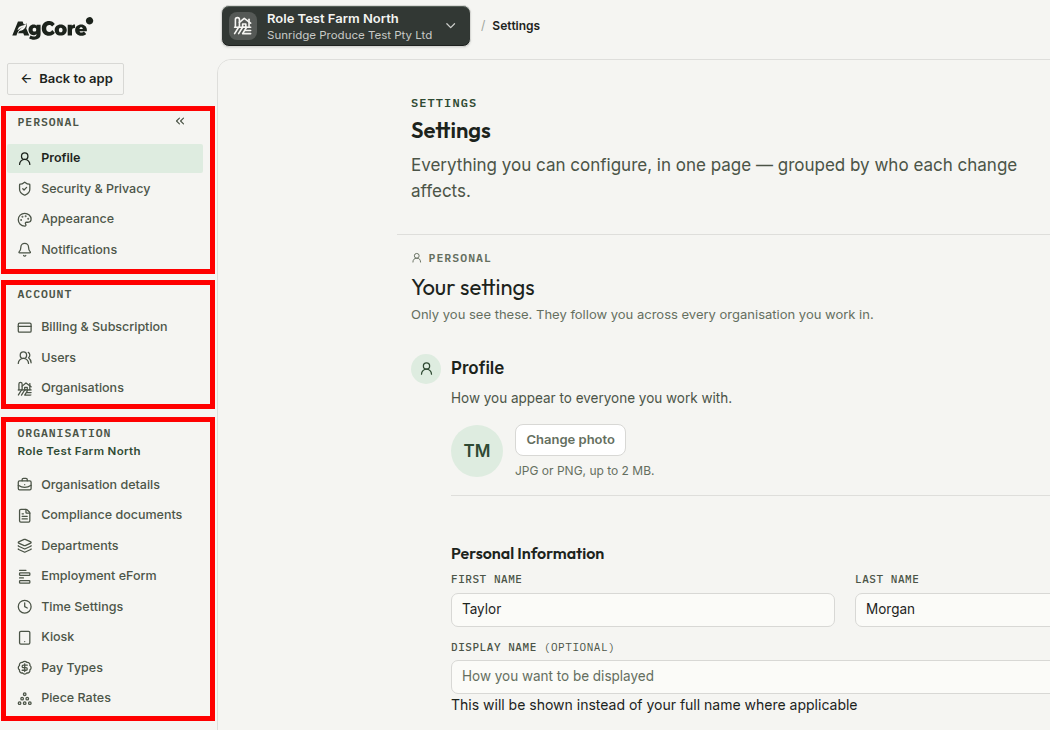
Personal settings follow you
Personal settings belong to your sign-in, not to a farm business. Your profile, account security, app appearance and notifications stay with you as you work across Organisations.
That means changing the app theme does not change it for the office, and updating your profile does not rewrite an Organisation's business details.
Account settings span the businesses you run
The Account is the umbrella above one or more Organisations. It is where AgCore brings together the subscription, the people with app access and the list of employing businesses held under the same customer relationship.
This keeps administration that spans the group separate from the records of one farm business. Adding an Organisation creates another business under the Account. It does not make that Organisation part of whichever farm you currently have open.
Organisation settings name the business they affect
The Organisation group carries the active Organisation's name. It covers that employing business and its configuration, including the way it records work and prepares pay.
When you choose another Organisation in the top bar, the group relabels and loads that business's settings. There is no second Organisation picker inside Settings, so the business named at the top is the business you are configuring.
This scope covers the employer record and its workforce rules. Land, water and farm assets are property records, so you manage them from the Map instead of Settings.
Your role also decides which sections you see. AgCore leaves out sections you cannot use rather than showing disabled controls. If every Organisation section is unavailable, the Organisation group is left out too.
Why the boundary matters on a multi-farm account
A grower may use one sign-in to work across a trust, a company and a packing business. The three-scope split answers the question that matters before every change: is this for me, for the Account, or for this Organisation?
That distinction keeps a personal choice from becoming a business rule and keeps one Organisation's operating setup out of another's records.
Open AgCore
Already have a login? Open Settings to see the three scopes for your Account and active Organisation. The detailed Settings reference stays in the app beside the screen it describes.
No account yet? Start a free 60-day trial — the full product, no credit card.