Why an agreed wage rate is locked
How an AgCore wage agreement pins the exact farm worker pay rate, then creates a dated rate record that later Pay Type changes cannot rewrite.
The published eForm carries an exact wage rate
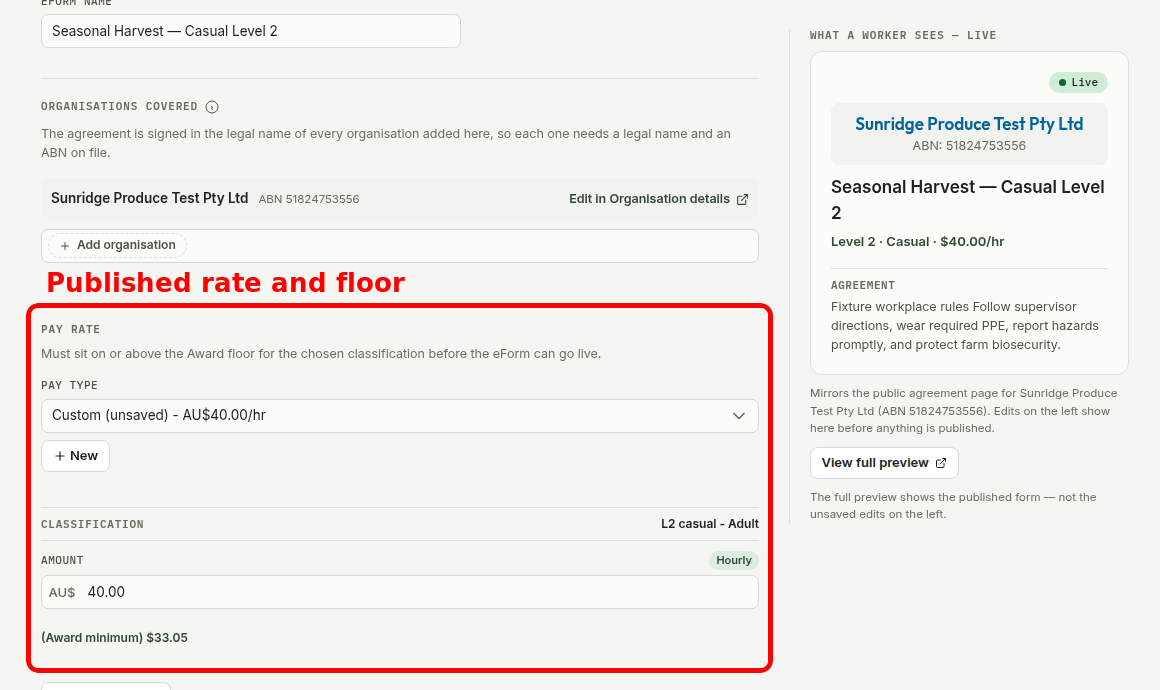
A published eForm contains the hourly amount, employment type and classification the worker is being asked to accept. It does not look up a Pay Type later.
AgCore checks the amount against the current award floor before publication and when a worker opens the link. If the floor rises above the published amount, the link pauses until the employer publishes a compliant rate.
The floor shown in AgCore comes from the effective-dated award row configured for the Organisation. The employer still chooses the award coverage and classification. AgCore does not make that legal decision.
Acceptance turns that amount into a dated worker rate
When the employer accepts the Submission, AgCore copies the amount, employment type and classification from the version the worker received. The new rate starts on the agreement date.
This rate snapshot records the wage both sides accepted. Payroll and later reviews can use the dated record without relying on the current eForm setup.
Changing a Pay Type does not rewrite an accepted rate
A Pay Type is a reusable starting point. It supplies a familiar name, classification and amount when the employer prepares a wage agreement.
Editing that Pay Type does not update a live eForm or an accepted worker rate. Publishing a new eForm version also leaves earlier agreements alone. A wage change needs a new agreement and effective date.
The agreement record does not replace minimum-wage checks
The snapshot records the amount in the accepted agreement, but it does not freeze the award floor. AgCore prices each hour at the higher of the resolved worker rate and the current floor. This floor lift does not rewrite the accepted agreement.
Employers still need to review current award rates and make a new agreement when the worker's wage changes.
The Fair Work Ombudsman's record-keeping and pay slips fact sheet explains the pay-rate records employers must keep.
Open AgCore
Already have a login? Open Agreements and select the eForm Setup tab to review a published rate. Open Pay & piece rates to manage Pay Types.
No account yet? Start a free 60-day trial — the full product, no credit card.