Your first pay run
How AgCore checks farm work across a complete pay run before a Xero or MYOB payroll handoff.
From recorded farm work to payroll
Your first pay run starts with the work record. AgCore keeps each worker's Time Entries, piecework, Department and Organisation together, then turns them into reports you can check before anything goes to payroll.
The Timesheet Report shows each worker by day, with ordinary hours, overtime, penalties and totals. The period, Departments and workers stay visible in the report configuration, so you can tell what the result covers.
Review the whole pay run
AgCore lists the eight most recent pay runs on Payroll → Export. A pay run covers one, two or four award weeks, following the Organisation's pay run schedule. Each run says whether it's ready or has workers to fix. Opening one shows the full dates and the values for each worker before anything is copied or sent.
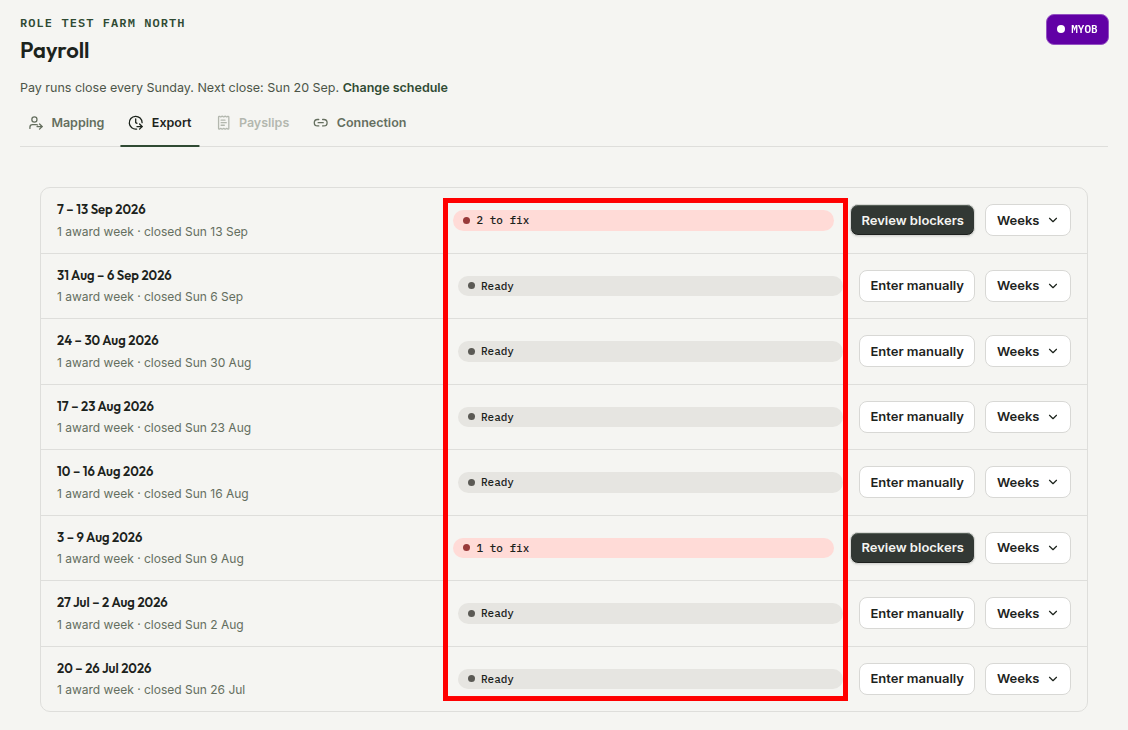
A worker is held back when their pay could come out wrong: an open shift, a correction nobody has dealt with, no pay rate, or, once a payroll platform is connected, no matching payroll employee. The pay run names each one and links to the screen where it's fixed. Piece-rate values stay separate from Minimum Wage Top-ups, so the office can see why the worker's payroll values differ from clock time.
Xero and MYOB payroll handoff
Without a payroll connection, the worker values stay copyable and can be marked as entered. MYOB also offers a CSV for each award week in the run. Xero Payroll Australia doesn't accept a timesheet CSV, so its manual path uses the values shown in AgCore.
If a payroll connection is available, AgCore can hand over the checked values directly. One worker's problem doesn't have to hold up everyone else: a connected run can send the workers who are ready while you fix the rest. The payroll provider still creates the pay run and pays the worker; AgCore doesn't move the money.
Once the payroll provider has paid the run, complete the pay run in AgCore. That freezes its Time Entries and piecework so paid hours can't change. A run completed too early can be reopened with a reason.
Why the record behind the pay run matters
A payroll total is only useful when you can get back to the hours behind it. AgCore keeps the employee, work date, Department and hour categories together in the report rather than leaving the office to match separate files.
The Fair Work Ombudsman record-keeping guide says employers must keep time and wage records for seven years. The detailed in-app guides cover corrections, payroll checks and provider setup next to the screens where that work happens.
Open AgCore
Already signed in? Open Payroll → Export to see the recent pay runs and their payroll status.
For the exact checks and handoff steps, follow the gated Run a payroll export guide after you sign in.
No account yet? Start a free 60-day trial — the full product, no credit card.